Everything inside
The whole studio.
Every tool in Session Bud and what it does. One purchase gets you all of it, and every tool is also a sentence away: tell ARIA and she does it.
You say it
The faders move.
Every command lands on the real mixer: levels, left-right positions, effects. Nothing here is a mock-up of what ARIA might do. It's what she does, on the channels you already have.
Every move, on record.
After an automatic mix, ARIA saves a full report into your session: every level, every EQ band and every compressor setting she chose. You can see exactly what she did, and change anything you like.
"do an automatic hip-hop mix" → 331 documented actions later, it's done.
The automatic mix runs on ARIA's brain, which uses your own OpenAI key.

Shown tuning third-party plugins installed on that machine; those are sold separately. Out of the box, ARIA mixes with the built-in FX.
She knows the manual.
"How do I record?" "Is there pitch correction?" Ask and you get exact steps: which button, which menu, which voice command. She's got the whole manual in her head, and she doesn't get tired of being asked.
"how do I record?" → every step, from arming the channel to pressing record.
Answers to questions come from ARIA's brain, which runs on your own OpenAI key.

The core
A serious DAW underneath.
Everything you expect from a modern studio is built in. ARIA is the fastest way to drive it, and the mouse still works exactly as it should.
Audio and MIDI, groups and FX buses, full routing, automation on everything.
Loop-record takes, audition them, comp the best parts, or let ARIA's Take Judge pick.
Surgical pitch editing on vocals: correct, scale-snap, quantize and glue, with A/B against the original.
Split any song into vocals, drums, bass and instruments. Four stems, ready to remix. Watch
Automatic vocal tuning with genre-appropriate strength, from transparent to tight. Watch
An instant backing band: pick a groove and play along, seconds after opening the app. Watch
EQ, compressor and a brickwall limiter are included, so a full automatic mix works with zero third-party plugins.
Hosts the VST3 plugins already on your machine; ARIA sees them and dials them in.
Render to target loudness with a full LUFS / true-peak report saved next to your file.
Piano roll, step sequencer, drum patterns, velocity and CC editing, MIDI learn for your controller.
One command checks your input, levels and monitoring, then tells you exactly what's wrong.
Measures your real round-trip latency and compensates recordings so takes land on the grid.
128 General MIDI instruments are built in, ready on any MIDI track: pianos, pads, strings, organs, brass, woodwinds, synth leads and a drum kit. Pick one from the instrument picker, or just say "piano midi 2". A sampler for your own sounds is in there too.
More in the toolbox
The rest of the studio.
The everyday tools a working DAW needs, each one also a sentence away.


- Align to lead. Recorded a double? Select the lead, then the double, and ALIGN TO LEAD lines it up in time. Watch
- Harmony voices. Build a third, a fifth or an octave from a vocal clip, each voice on its own new channel. Watch
- Sampler. Put any sound of yours on a MIDI channel and play it across the keyboard, middle C at the original pitch.
- Free Warp. Click to place a marker, drag it to stretch the audio, no cutting.
- GHOST. Played something great without pressing record? The last 10 minutes on the armed channel are still there. Watch
- Tuner. Standard, drop, open and slide tunings, bass, ukulele, mandolin, banjo, and a POLY mode that reads all the strings at once.
- Chord track and Scale Assistant. Set the key, snap notes to the scale, stamp chords onto a MIDI clip by voice.
- Mix snapshots and track versions. Keep A, B and C of the mix, and several takes of an edit on one track.
- Freeze and bounce in place. Render channels you are done with, save CPU and latency, undo whenever.
- Step sequencer and drum loops. Program a beat on a 16-step grid or lay a tempo-synced loop in one click.
- Spectrum analyzer. A floating analyzer with a live peak readout, and a split stereo view.
- Loudness report. Ask
how loud is it
and get the LUFS and true-peak numbers for delivery. - Session templates by voice.
vocal session
ornew beat session
sets up channels, buses, metronome and count-in. - DAWproject export. Take the session, channels and all, into another DAW that reads the format.
- MIDI files. Drop a .mid onto the grid or use File > Import, and every track in the file becomes its own instrument channel, with the file's tempo on an empty session. Any MIDI clip exports back to a .mid.
The FX are already inside.
Every channel ships with a 4-band parametric EQ, compressor, delay, reverb and a limiter. They're the same processors ARIA drives during an automatic mix, so there's no shopping list and no plugin folder to fill first.
If you already own more, your VST3 plugins rack up beside the built-ins in the same insert slots.

See the ADD VST3 slot? That's where your own plugins go, and they're sold separately by their vendors.
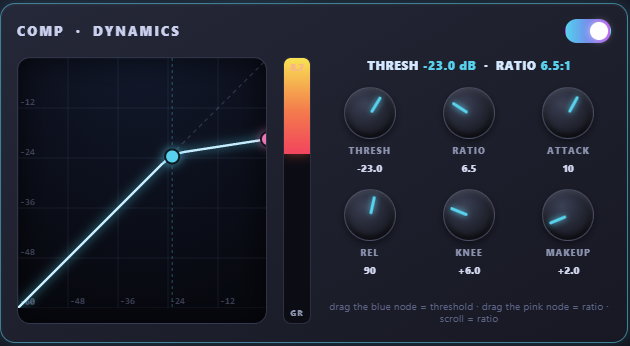
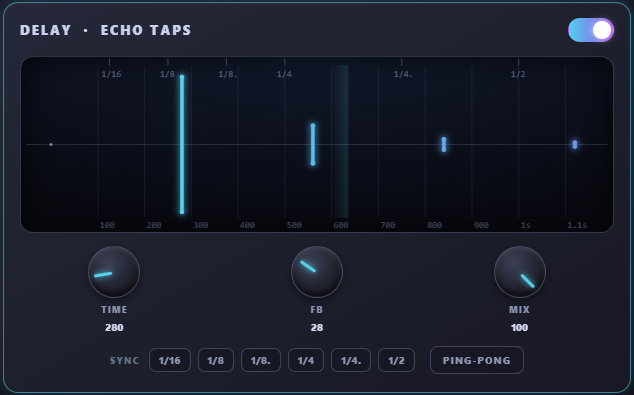
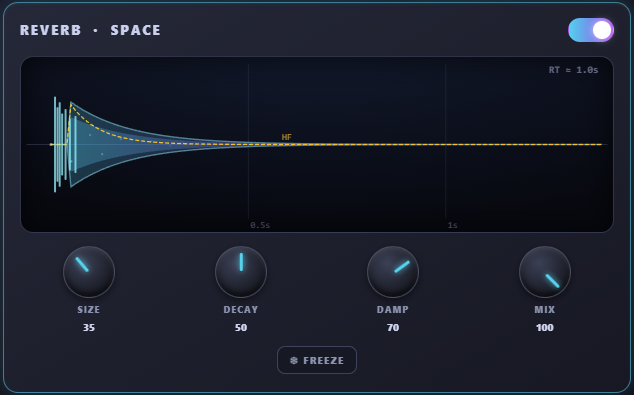
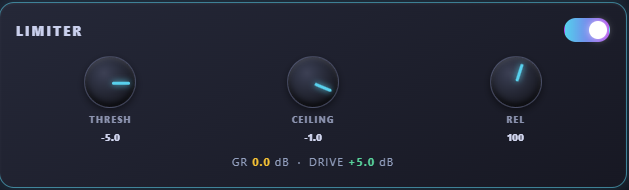
Every view, full-screen
Take a look around.

Shown hosting ZL Equalizer and Surge XT, which are free open-source VST3 plugins. The built-ins on their own still do a full automatic mix.


No new gear required
Runs on the studio you already have.
Session Bud was tested end to end, from recording through a full automatic mix to export, on a 12-year-old laptop with a 15-year-old USB interface. If your machine runs Windows 10, you're fine.
Before you buy
What you need to run it.
- Operating system
- Windows 10 or 11, 64-bitThat's it. There's no macOS or Linux version today.
- Audio hardware
- Any audio device worksAn interface with ASIO drivers is recommended for low-latency recording.

- Plugins
- None requiredBuilt-in EQ, compressor, delay, reverb and limiter are included, and ARIA's automatic mix is calibrated to do the whole job with them. She is also calibrated for a set of Waves plugins: if that set is installed on your machine, she uses it; if not, she mixes with the built-ins. Waves plugins are sold separately, directly by Waves, and none are bundled with Session Bud. Any other VST3 plugins you own are welcome too.
- For ARIA · OpenAI API key
- Optional. It unlocks her brain.The studio and ARIA's everyday commands work without one. Your own OpenAI key unlocks her brain: the automatic mix and the static mix, diagnosing problems, answers to any question, and free wording in your own language. What's free, what the key adds, and what it costs
Straight answers
More questions.
How do I get the software after paying?
After purchase you get an email with your download link and personal license key. Enter the key on first launch and you're running. That email thread is also your direct support line to the developer.
Can I move my license to a new computer?
Yes. One license covers two computers at a time, say a desktop and a laptop: activate with the same serial on both. Need a third? Activate there and it replaces the computer you used least recently, up to twice a year, right from the activation screen. You don't need to contact support.
What happens to my license if Session Bud shuts down?
Your studio keeps working. If Session Bud ever closes its doors, every sold license gets a free offline unlock, so activation stops depending on our servers. You bought the software and it stays yours.
That promise covers the DAW, which runs entirely on your machine. ARIA's cloud features run on OpenAI's API with your own key, so if OpenAI ever changed or restricted access, her thinking features would be affected. The studio itself keeps working.
Does it import projects from other DAWs?
Session Bud imports and exports standard interchange: WAV/MP3 audio, MIDI files, and stems. Drop your multitrack exports in and mix.
Are Waves or other commercial plugins included?
No. Session Bud works with the VST plugins already installed on your computer, and ships with its own built-in EQ, compressor and limiter. A complete automatic mix works out of the box with zero third-party plugins.
Third-party plugins that appear in screenshots belong to that machine's owner and are sold separately by their vendors.
The automatic mix was calibrated by ear on a machine that has commercial plugins installed, so those are the names ARIA reaches for first when she finds them. A different plugin set changes the character of the mix, not its balance. She renders every group with its own chain and measures it, then sets the faders from that measurement, and the built-in chain carries a separate calibration of its own.
Is there a trial version?
Yes. Enter your email, confirm it, and you get a serial that opens everything for 14 days on one computer. No card needed. When the trial ends you can still open your sessions and listen to them; buying unlocks working again, and purchases carry the 14-day money-back guarantee on top.
Questions about ARIA and the OpenAI key are answered on ARIA & AI setup.
Ready when you are
Get Session Bud.
$79 once at the founder price (the first 500 licences, then $129), with a 14-day money-back guarantee. Or start with the free 14-day trial: everything open, no card.
Free from the Microsoft Store · Windows 10/11 64-bit